If your Traffic Acquisition report shows almost no sessions from ChatGPT, Perplexity, or Gemini, your property is almost certainly undercounting. The sessions are arriving. They are being misclassified as Direct or absorbed into an undifferentiated Referral pile – invisible in every report you run.
There are two methods for checking AI traffic in Google Analytics 4 (GA4). The first is a native channel group Google added in May 2026 that works with zero configuration. The second is a custom channel group you build yourself using a regex filter – it covers historical data the native channel cannot reach and catches AI platforms Google has not yet added to its recognized list.
Use both. But go in with accurate expectations. Even with both methods running, research suggests more than 70% of AI-referred sessions arrive with no referrer header at all and land invisibly in Direct. The two methods together give you a floor. The real number is higher.
What Is the GA4 AI Assistant Channel?
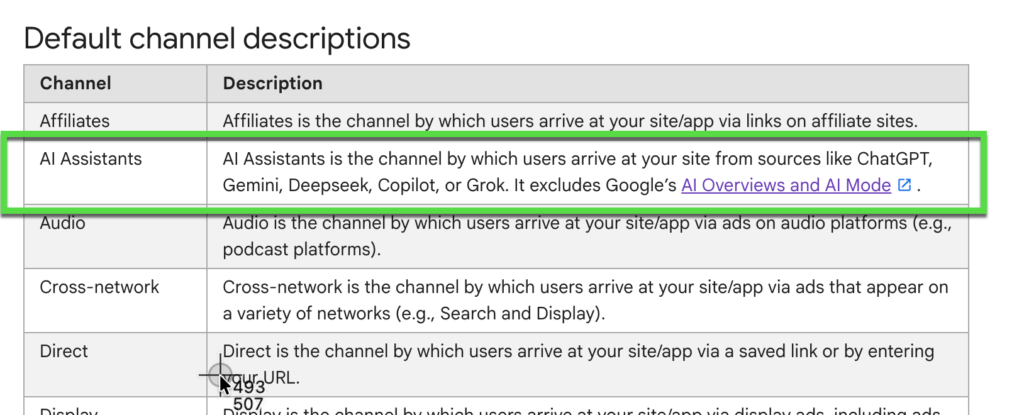
The AI Assistant channel is a native default channel group Google added to GA4 on May 13, 2026. It automatically classifies sessions as “AI Assistant” when the referrer domain matches a list of recognized AI platforms. No configuration required on your side.
Before this update, sessions from chatgpt.com, perplexity.ai, claude.ai, and similar platforms landed in your Referral channel alongside press coverage, directory listings, and partner traffic. There was no way to isolate them without building a custom filter. The new channel group separates them automatically – when a recognized AI platform passes a referrer header on a click to your site, GA4 assigns the medium “ai-assistant” and the campaign “(ai-assistant).”
This is useful, but it comes with a hard limitation. The channel only holds data from May 13, 2026 onward. There is no retroactive reclassification of sessions before that date. If you want to understand what your AI traffic looked like for the past year – before the update – you need Method 2.
Method 1: How to Find Your AI Assistant Channel Traffic
Go to Reports, then Acquisition, then Traffic Acquisition. Set the primary dimension to Session default channel group. Look for the AI Assistant row. If it is there, your property is receiving qualifying AI-referred sessions. No admin configuration required.
Step-by-Step
- Step 1: Open Reports from the left navigation in GA4.
- Step 2: Select Acquisition, then Traffic Acquisition.
- Step 3: Confirm the primary dimension dropdown is set to “Session default channel group.”
- Step 4: Scan the channel table for “AI Assistant.” If there is no row, your site has received no qualifying sessions yet, or all AI platform referrer headers are being stripped before reaching your server.
- Step 5: Add “Session source / medium” as a secondary dimension. This breaks the AI Assistant row into individual platform sources – chatgpt.com, perplexity.ai, gemini.google.com, and claude.ai appear as separate rows with their own session counts and conversion data.
- Step 6: For deeper analysis: open Explore, then Free Form. Drag “Session default channel group” to Rows. Add Sessions, Engaged sessions, and Conversions as metrics. Filter to the AI Assistant channel. Compare your conversion rate here against other channels – the difference is often significant.
AI-referred visitors arrive with context. They asked an AI a question and followed a citation to your site. Conversion rate data from multiple studies shows ChatGPT-referred sessions converting at 10-16%, compared to roughly 1.8% for Google organic. Track conversion rate as your primary metric here – not just session volume.
One important caveat: this method only holds data from May 13, 2026. If your GA4 property predates that – and it does – you have a gap in AI attribution that the native channel cannot fill retroactively. That is what Method 2 addresses.
Method 2: Track LLM Referral Traffic with a Custom Channel Group
A custom channel group in GA4 lets you classify sessions using a regex filter applied to the source dimension. Unlike the native AI Assistant channel, it applies retroactively to all historical data in your GA4 property and catches AI platforms not yet on Google’s recognized list.
This is the method you need when you want to compare your AI referral volume from six months ago to today, when you are preparing a stakeholder report that covers a period before May 2026, or when you want a custom definition you fully control – one you can extend as new AI tools gain traction.
Step-by-Step
- Step 1: In GA4, go to Admin (gear icon, bottom left).
- Step 2: Under Data Display, click Channel Groups.
- Step 3: Click “Create new channel group” and give it a name – for example, “AI Referral Sources.”
- Step 4: Click “Add new channel” and name the channel “AI Traffic.”
- Step 5: Set the condition to: Source matches regex.
- Step 6: Paste the regex pattern below into the value field. The first pattern is taken directly from Google’s own custom channel group documentation – the second adds additional sources.
- Step 7: Click Done, then drag “AI Traffic” to the top of the channel list. GA4 assigns sessions to the first matching channel definition in order. If Referral sits above your new channel, chatgpt.com sessions match Referral first and your AI Traffic channel never receives them.
- Step 8: Click Save group.
- Step 9: Return to Traffic Acquisition and apply your new channel group from the channel group dropdown above the chart. Your AI Traffic row now shows data going back to the start of your GA4 property history.
Regex Pattern 1 – Google’s official AI assistants example (Source matches regex):
^.*ai|.*\.openai.*|.*chatgpt.*|.*gemini.*|.*gpt.*|.*copilot.*|.*perplexity.*|.*google.*bard.*|.*bard.*google.*|.*bard.*
Regex Pattern 2 – Extended pattern for broader coverage (Source matches regex):
chatgpt\.com|chat\.openai\.com|perplexity\.ai|claude\.ai|anthropic\.com|gemini\.google\.com|copilot\.microsoft\.com|deepseek\.com|grok\.com|meta\.ai|you\.com|poe\.com
If your GA4 property has never had a custom channel group for AI traffic, you have no historical attribution baseline to measure against. Every month of data before today still contains those AI-referred sessions – they are sitting in your Referral or Direct channels right now. Setting up Method 2 surfaces them retroactively.
If your property setup needs a full review beyond AI traffic – covering data layer, conversion events, filters, and attribution configuration – a Waftr GA4 audit covers custom channel groups as part of the full property assessment.
What Both Methods Together Still Miss
Both methods only capture sessions where the browser sends a referrer header to your server. When that header is absent, GA4 has no information about the session origin. It lands in Direct or gets assigned to (not set). This happens regardless of which methods you have running.
Three situations strip referrer headers reliably:
- Mobile app traffic. ChatGPT, Copilot, Gemini, and Perplexity all have mobile apps. App-to-browser transitions do not pass referrer headers. Every click from a user on the mobile app version arrives at your server with no attribution data.
- Copy-paste behavior. A user reads an AI response, copies the cited URL, and opens it manually in a new tab or browser window. No referrer is sent. GA4 sees it as a Direct session.
- Privacy settings and extensions. Browsers with strict privacy modes and extensions such as uBlock Origin or Privacy Badger can strip referrer headers before the request leaves the browser.
There is no GA4 configuration that recovers these sessions. For links you control – newsletters, social posts, outreach emails – add UTM parameters. UTMs override whatever the browser does with the referrer header and survive the trip to your server intact. For third-party AI citations of your content, the sessions are not recoverable from GA4 reports alone.
Treat the combined output of both methods as a lower bound on your actual AI-referred traffic. The true number is higher – in some property analyses, substantially so.
Understanding where your measurement gaps sit – beyond AI traffic alone – is what a Waftr SEO/AEO Analytics setup is designed to address. If you are investing in content and AEO and cannot connect that investment to measurable site activity, the measurement infrastructure is the problem.
Run Both Methods Together
Method 1 and Method 2 are not alternatives – they complement each other and cover different ground.
The native AI Assistant channel (Method 1) requires no setup and is active automatically from May 2026 forward. Use it as your ongoing monitoring tool: check month-over-month AI traffic growth, compare conversion rates across AI platforms, and track which specific tools are sending the most qualified visitors.
The custom channel group (Method 2) applies retroactively across your full property history. Use it for any analysis that spans before May 2026, for historical trend reports, and for capturing AI sources Google has not yet added to its default definitions. As new AI tools emerge, you extend the regex. The native channel requires Google to update its list.
Running both and comparing them also surfaces something useful: the gap between what Method 2 identifies and what Method 1 independently labels shows you which AI platforms are sending referrer-intact traffic that Google already recognizes, versus which ones are arriving with referrers that GA4 has not yet categorized.
Note: Where an AI-referred click ends up in GA4 depends entirely on whether the referrer header survives the journey from the AI platform to your server.
Frequently Asked Questions
Q: Does GA4 automatically track traffic from ChatGPT?
A: From May 13, 2026 onward, yes, and automatically. GA4 now classifies sessions from recognized AI platforms, including chatgpt.com, under the native AI Assistant channel group with no setup on your end. The catch: mobile app traffic and copy-paste behavior strip referrer headers, so a large share of ChatGPT-referred sessions still land in Direct and stay invisible to both methods.
Q: What is the GA4 AI Assistant channel?
A: The AI Assistant channel is a default channel group Google added to GA4 in May 2026. It automatically classifies sessions where the referrer domain matches a recognized list of AI platforms – ChatGPT, Gemini, Claude, Perplexity, and others – assigning the medium “ai-assistant” and the campaign “(ai-assistant).” No admin configuration is required.
Q: Why is my AI traffic showing as Direct in GA4?
A: Referrer stripping is almost always the cause. When the referrer header gets dropped before it reaches your server, AI platform sessions default to Direct. This happens reliably with mobile app versions of AI tools, copy-paste URL behavior, and browsers or extensions that block outgoing referrers. No GA4 setting recovers these sessions – the gap is structural, not something you misconfigured.
Q: How do I see which AI platforms are sending traffic to my site?
A: In Traffic Acquisition, add “Session source / medium” as a secondary dimension. The AI Assistant channel row breaks into individual sources – chatgpt.com, perplexity.ai, gemini.google.com, and claude.ai each appear as separate rows with their own session counts and conversion metrics. For a more flexible breakdown, use Explore with Free Form and filter to the AI Assistant channel.
Q: Can I see AI referral traffic from before May 2026 in GA4?
A: Not using the native AI Assistant channel, which only contains data from May 13, 2026. To access historical AI referral data, set up a custom channel group in Admin, Data Display, Channel Groups using a regex filter targeting AI platform domains. This applies retroactively to all existing data in your GA4 property – the sessions are already there, they just need to be correctly classified.
Q: Is AI referral traffic worth tracking if my current volume is low?
A: Worth tracking regardless of current volume, and the conversion numbers explain why. Multiple data sets show ChatGPT referral sessions converting at 10-16%, against roughly 1.8% for Google organic. Low volume right now mostly means you are early. Set up tracking today and you will have a real baseline in place before the channel grows, instead of trying to measure that growth later with nothing to compare it against.
Q: What is the difference between the GA4 AI Assistant channel and a custom channel group?
A: Ownership is the real difference. Google’s AI Assistant channel classifies sessions automatically from May 2026 onward, covering a predefined list of recognized platforms that you cannot edit. A custom channel group runs on regex you write and control: it reaches back across your full data history and can catch AI sources Google has not added yet. Most properties end up needing both.
The AI Sessions Are Already Hitting Your Site. Make GA4 Show Them to You.
Both methods together still leave a significant blind spot from stripped referrers. A Waftr GA4 audit identifies every attribution gap in your property and sets up the complete AI traffic tracking framework – so you know exactly how much AI-referred traffic you are actually receiving.
