Every Google Analytics 4 (GA4) report has a confidence problem. The number on the dashboard rarely matches what the CRM says, what the ad platform says, or what actually happened in the business. Most teams notice the gap and decide the problem is them. They assume they are reading the wrong report or comparing the wrong metric. They are not. GA4 is structurally built to mislead unless it is wired carefully against that tendency.
These problems are not malicious. They are the cumulative effect of bot traffic that looks human, ad blockers stripping referrers, consent banners modeling missing data, attribution defaults that favor the platform paying the bills, and a Direct traffic bucket that quietly absorbs everything GA4 cannot explain. By the time the dashboard renders, the original signal has been bent in seven distinct ways.
This is the diagnostic Stephen Smith runs at the start of every Waftr engagement. Each of the seven reasons below has a specific cause, a specific symptom, and a specific fix. None of them require throwing GA4 out. They require knowing what GA4 is actually telling and what it is hiding. For teams building from scratch, the GA4 implementation guide for 2026 is the companion playbook to this audit – it covers the setup decisions that prevent six of the seven reasons before they ever start.
Where the Distortions Enter the GA4 Pipeline
GA4 data gets distorted at six distinct points in the pipeline. From the user’s browser to the final report, every layer adds its own noise or removes its own signal. Knowing which layer corrupted the data is the only way to fix the right thing.
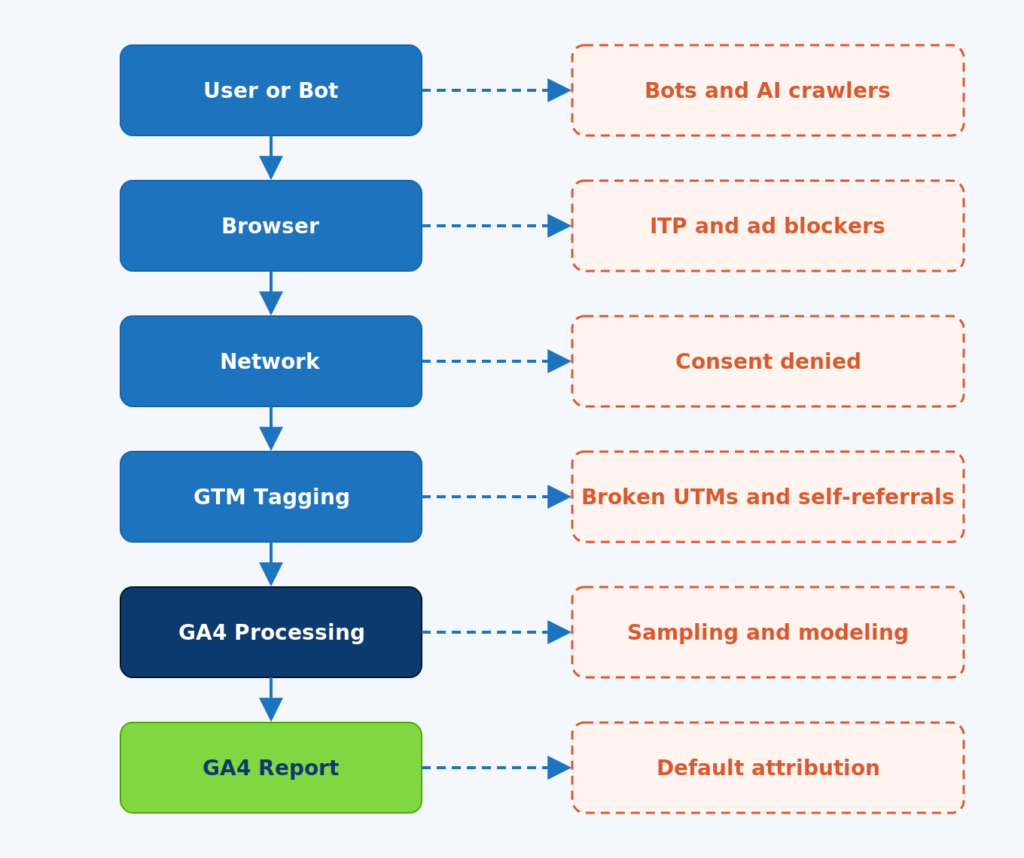
Figure 1. The six layers of the GA4 pipeline and the distortion that enters at each one.
Walk it top down. At the user layer, bots and AI crawlers enter alongside real humans. At the browser layer, intelligent tracking prevention (ITP) and ad blockers strip referrers and shorten cookies. At the network layer, consent denial wipes a chunk of sessions before they reach Google Tag Manager (GTM). At the GTM layer, broken UTMs and self-referrals from payment providers reset the original source. At the GA4 processing layer, sampling and behavioral modeling smooth the numbers. At the final report layer, the default channel grouping and attribution model decide who gets credit.
Each layer has a fix. The sections below cover the seven specific reasons GA4 data is inaccurate, in the order they hurt the most.
Reason 1 – Direct Traffic Is Not Actually Direct
Direct traffic in GA4 is not people typing the URL into a browser. It is the catch-all bucket for sessions GA4 cannot attribute to a known source. Every untraceable session lands there, including dark social, in-app browsers, stripped referrers, AI assistants without a referrer, and HTTPS-to-HTTP downgrades.
On a recent SaaS audit, Stephen found 47% of Direct traffic was actually identifiable as LinkedIn, ChatGPT, or Slack referrals once dark social tracking was layered in. The marketing team had been describing their Direct channel as brand strength. It was mostly LinkedIn posts and Slack DMs that lost their referrer when users clicked through native apps.
Specific causes that route real traffic into Direct: links shared inside Instagram, LinkedIn, TikTok, and Facebook apps (the in-app browser strips referrer headers). HTTPS source pages linking to HTTP destinations (referrer is dropped per RFC). Mobile push notifications that open in webviews. Email clients that strip referrers. AI assistant tools that send users without a referrer header. Browser privacy settings like Brave’s strict mode. Server-side redirects that lose the original referrer.
The fix is two-part. First, tag every link the team controls with UTM parameters. Email campaigns, social posts, partnership placements, even internal Slack messages that link to landing pages. If the team controls the link, the team controls the attribution. Second, build custom channel groups in GA4 that catch known unrecognized sources (chatgpt.com, perplexity.ai, lnkd.in, l.facebook.com, l.instagram.com, etc.) and route them to descriptive channels instead of letting them fall to Direct.
Custom channel group rule – rescue dark social from Direct
Channel: Dark Social
Condition: Source matches regex (lnkd\.in|l\.facebook\.com|l\.instagram\.com|t\.co|out\.reddit\.com)
Place: Above Direct in the channel group order
Channel: AI Assistant (custom)
Condition: Source matches regex (chatgpt\.com|perplexity\.ai|copilot\.microsoft\.com)
Place: Above Direct
Reason 2 – Bot and AI Crawler Traffic Looks Human
GA4’s Exclude Known Bots filter catches roughly 43% of automated traffic. The remaining 57% passes through and inflates session counts, pageviews, engagement metrics, and conversion rates. In 2026, bot and AI crawler traffic accounts for 30 to 50 percent of total web requests.
The filter uses the IAB/ABC International Spiders and Bots List. The list is curated and updated quarterly. Most AI crawlers – GPTBot, ClaudeBot, PerplexityBot, ByteSpider – are not on it. Custom scrapers and headless browser farms simulating real behavior never were. 42% of automated traffic in 2026 uses Large Language Models to simulate human interaction patterns including realistic scroll depth and dwell time.
On an ecommerce audit Stephen ran late last year, the team noticed an unexpected 18% month-over-month traffic lift with no campaign changes or SEO wins. BigQuery analysis showed 73% of the new traffic came from three data-center IP ranges in Singapore and China hitting product detail pages at machine speed. Engagement time was zero. Conversion rate from those sessions was zero. The CMO had been celebrating the wrong number.
The fix has three layers. First, add hostname filtering to drop events that arrive with a hostname that is not yours – this stops referrer-spam events appearing in reports. Second, deploy server-side filtering in the sGTM container or BigQuery to drop sessions matching known data-center IP ranges, sessions with zero engagement time, and sessions with suspicious user-agent strings (HeadlessChrome, PhantomJS, common scraper signatures). Third, run a monthly BigQuery query that flags sessions with engagement_time_msec equal to zero and reviews the source/medium distribution. Spikes there are bots.
BigQuery query – flag suspicious bot signatures
SELECT
  event_date,
  device.browser AS browser,
  geo.country AS country,
  COUNT(DISTINCT user_pseudo_id) AS users,
  COUNTIF(engagement_time_msec = 0) AS zero_engagement
FROM `project.analytics_xxxxx.events_*`
WHERE event_name = 'session_start'
  AND _TABLE_SUFFIX BETWEEN '20260401' AND '20260430'
GROUP BY 1, 2, 3
HAVING zero_engagement / users > 0.8
ORDER BY users DESC
LIMIT 100;
Reason 3 – GA4 Conversions Are Not CRM Conversions
A GA4 conversion is whatever event the team flagged as a key event. It rarely equals a closed deal or a qualified lead. The mismatch between GA4 conversions and CRM revenue is structural, not a bug.
GA4 counts sessions and events. The CRM counts contacts, opportunities, qualified leads, and closed revenue. Different denominators, different attribution windows, different identity resolution. GA4 by default uses a data-driven attribution model. Google Ads by default uses last-click. The CRM uses self-reported attribution or a first-touch model. The same conversion shows up with different sources across all four platforms and none of them is wrong – they are just measuring different things.
On a B2B SaaS engagement Stephen worked through, GA4 reported 340 conversions for the month. The CRM showed 22 qualified leads. The CMO was furious – which number was right? Both. GA4 was counting form submissions including bots, internal QA tests, and unqualified personal-email signups. The CRM was counting people who responded to outbound and got tagged as qualified by an SDR. The two were measuring different things entirely. The fix was not making them match. The fix was deciding which number drives which decision.
The principle is simple. Use the CRM as the source of truth for revenue and qualified leads. Use GA4 for traffic, engagement, and channel performance up to the conversion event. Stop trying to make them match. For paid acquisition, set up offline conversion upload from the CRM back to Google Ads so the ad platform optimizes for qualified leads instead of form fills. This single change usually moves CAC by 20 to 30 percent within 60 days because the bidding algorithm finally has the right signal.
Reason 4 – Sampling Quietly Smooths the Numbers
GA4 samples data in Explore reports once a property exceeds 10 million events in the selected date range. Standard reports apply thresholding to suppress small row counts. The dashboard shows smooth, plausible numbers. The underlying data does not match.
Sampling kicks in silently. The little badge in the corner of an Explore report says This report is based on 100% of available data until it does not. Many users never notice the badge change. Threshold-based reporting suppresses data points when a row’s count is below the threshold required to anonymize users – common with custom dimensions that have many unique values (user_id, account_id, location_city).
On a SaaS engagement Stephen audited, a high-value Explore segment showed 4,200 sessions when sampling kicked in but 4,840 sessions when the same query ran in BigQuery against the raw data. The 15% gap quietly changed which channel looked profitable for the quarter. The team had been making channel investment decisions on smoothed numbers without knowing.
The fix is to connect BigQuery on day one and run any audit query in BigQuery, not in the GA4 UI. The UI is for exploration. BigQuery is for decisions. For dashboards that need to be defensible, use the GA4 Data API with explicit sampling parameters or pull directly from BigQuery into Looker Studio. A proper GA4 audit always starts with a sampling check on the top three metrics the team relies on.
Reason 5 – Consent Mode v2 Modeled Data Looks Real
Consent Mode v2 fills in gaps from users who denied consent using behavioral modeling. The modeled numbers appear in standard reports without any visual indication that they are estimates, not measurements.
When a user denies consent and Consent Mode is configured correctly, GA4 still receives cookieless pings. These pings carry session metadata but no client_id. Google then uses machine learning to model conversions, sessions, and engagement for the denied portion of traffic based on patterns from the consented portion. The output is plausible. It is not what actually happened. For properties with denial rates above 30 percent, the modeled portion materially affects the reported numbers.
An ecommerce client of the Waftr team had a 32% consent denial rate after rolling out a new CMP. GA4 reports continued to show stable conversion rates. BigQuery raw data told a different story – actual measured conversions had dropped 28% while modeled conversions filled the gap. The team had been making channel investment decisions on modeled data without knowing. Auditing this properly requires the same kind of work as a website privacy services review since consent rates drive everything downstream.
The fix is to know which numbers are modeled and which are measured. Check Admin, then Property Settings, then Data Collection to see the modeling status. In BigQuery, the events_intraday_* tables let you separate measured events from modeled estimates. For board-level reporting that needs to be defensible under scrutiny, use measured-only views and disclose the modeling status alongside the metric.
Reason 6 – Self-Referrals From Payment Providers Reset the Source
When a user hops to Stripe, PayPal, an SSO provider, or any third-party domain during a session, GA4 by default treats the return as a new referral. The original source gets overwritten. The conversion gets attributed to the payment provider, not the campaign that drove the visit.
Cross-domain measurement and unwanted referrals lists are configured per data stream. Without them, every checkout looks like Stripe brought the customer. Every SSO login looks like Google brought them. Every embedded chat widget that opens in a separate domain breaks the session.
Stephen audited a high-volume direct-to-consumer brand whose top referral source was stripe.com – generating $1.2M in monthly attributed revenue. None of it was real. Stripe was the checkout step that customers passed through on their way to a purchase. The actual campaigns driving sales were getting zero credit for closing. The Facebook Ads team was getting cut because their ROAS looked terrible. The fix surfaced the real ROAS and reversed the budget decision the same week.
The fix is to add every payment, auth, chat, and third-party widget domain to the unwanted referrals list under Admin, then Data Streams, then Configure Tag Settings, then List Unwanted Referrals. Common entries: stripe.com, paypal.com, checkout.shopify.com, accounts.google.com, login.microsoftonline.com, intercom.io, chat.openai.com (if customers paste affiliate links there). Test the full purchase flow in DebugView after adding each one. The source attribution should persist from landing page through purchase confirmation without any intermediate referrer overwriting it.
Recommended unwanted referrals list – starting set
- stripe.com
- checkout.stripe.com
- paypal.com
- checkout.shopify.com
- pay.amazon.com
- accounts.google.com
- login.microsoftonline.com
- auth0.com
- okta.com
- intercom.io
- zendesk.com
Reason 7 – Unassigned Traffic Is GA4 Giving Up
Unassigned traffic is GA4 admitting it has no idea what channel to assign a session to. If unassigned exceeds 1 percent of total sessions, the channel grouping is broken.
Sessions become unassigned when the source/medium combination does not match any rule in the default channel group. Common cause: UTM tags with custom medium values like sms_blast, pdf_link, or qr_code that do not match GA4’s allowed mediums (organic, cpc, referral, email, paid_social, display, affiliate). Less common but increasingly important: AI assistants that set utm_source but no utm_medium, which falls through to unassigned in most setups.
On a recent engagement Stephen ran, 18% of paid campaign traffic landed in unassigned because the agency was using utm_medium=paid instead of utm_medium=cpc. The CMO had been looking at paid performance metrics that excluded almost a fifth of paid traffic for nine months. Adjusting the UTM templates and rebuilding nine months of channel groups in BigQuery took two weeks. The lost insight cost roughly $400K in misdirected budget across that period.
The fix is to audit UTM coverage of every campaign URL the team controls and build custom channel groups that map all real UTM patterns to recognizable channels. Add a catchall rule that routes any session with a utm_source but no utm_medium to Other Tagged Traffic instead of letting it fall to unassigned. The principle is simple: every session should have a deliberate channel, even if that channel is Other.
The GA4 vs Reality Gap
After all seven distortions stack, the gap between actual business reality and GA4’s reported number is typically 30 to 40 percent. The gap is not because GA4 is broken – it is because every layer is doing something different from what the dashboard suggests.
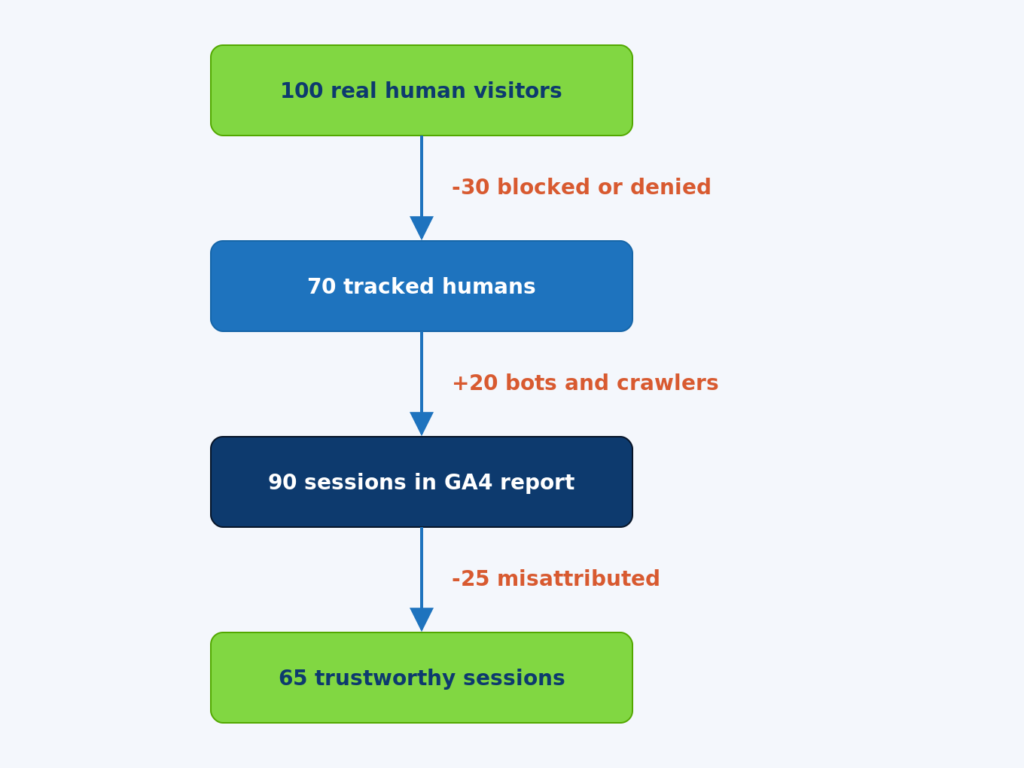
Figure 2. The funnel from 100 real human visitors to 65 trustworthy reported sessions in GA4.
Walk the numbers in the diagram. Start with 100 real human visitors. Of those, roughly 30 are dropped before GA4 sees them – some to ITP and ad blockers stripping the request, some to consent denial when the user declines tracking, some to in-app browsers that suppress the referrer. That leaves 70 tracked humans.
To those 70, GA4 adds roughly 20 bot or AI crawler sessions that slip past the default bot filter. The report now shows 90 sessions. The team looks at the dashboard and sees a number that is 90% of reality, except it is the wrong 90% – 20 of those sessions are not real and 30 real sessions are missing.
Of the 90 sessions GA4 reports, roughly 25 are misattributed because of self-referrals from payment providers, broken UTMs landing in unassigned, dark social falling into Direct, or default last-click attribution overriding the actual driving channel. The final number of sessions that are both counted AND attributed correctly is 65 – a 35 percent gap from the original 100 real visitors.
These percentages vary by industry, region, and setup quality. For ecommerce sites with mature tracking, the gap can be as small as 15 to 20 percent. For B2B SaaS with heavy LinkedIn and dark social discovery, the gap is often 40 to 50 percent. The point is not the exact number. The point is that the gap exists, has a known structure, and can be measured.
How to Actually Trust GA4 – The 5-Step Repair
GA4 becomes trustworthy when five things are in place: BigQuery export, server-side tagging, custom channel groups, an unwanted referrals list, and a monthly validation routine. None of these are optional in 2026.
Step 1 – Connect BigQuery from day one
The BigQuery link gives you unsampled raw events with no thresholding. Run every audit query in BigQuery, not the GA4 UI. The cost is roughly $5 to $50 per month for typical SaaS traffic. The value is the ability to defend any number to leadership.
Step 2 – Move revenue-affecting tags to server-side GTM
Server-side tagging recovers 30 to 35 percent of conversions that ITP and ad blockers drop on the way to Google. For any business with paid acquisition, this is the single highest-leverage fix in this list.
Step 3 – Build custom channel groups
The default channel group routes too much real traffic to Direct, Unassigned, and Referral. A 30-minute investment in custom channel groups makes the channel report match how the business actually thinks about acquisition.
Step 4 – Add every third-party domain to unwanted referrals
Payment providers, SSO, chat widgets, affiliate networks. Every domain a user passes through during a session that is not your domain needs to be in the unwanted referrals list. This stops the source from getting reset at checkout.
Step 5 – Run a 15-minute monthly validation
Compare GA4 sessions to ad platform clicks and CRM contacts for the previous month. Track the ratio. Flag any change of more than 10 percent. Most tracking problems are caught within 30 days when this check happens. Most are caught after six months when it does not.
Frequently Asked Questions
Q: Why are GA4 conversion numbers and Google Ads conversion numbers always different?
A: Different attribution models, different lookback windows, different identity resolution. Google Ads uses last Google Ads click by default. GA4 uses data-driven attribution by default. The same conversion is attributed to different sources by each platform. A 10 to 20 percent gap is expected. A gap above 30 percent means something is broken on at least one side.
Q: How accurate is GA4 modeled data?
A: Modeled conversion accuracy from Google’s published documentation lands at 70 to 90 percent for most properties. Accuracy degrades when consent denial rates exceed 40 percent or when the property has fewer than 1,000 conversions per week. For low-volume B2B properties, modeled data is unreliable enough that it should be disclosed alongside any metric that depends on it.
Q: Should the team panic if Direct traffic is more than 40 percent of total?
A: Yes. Healthy Direct traffic for most B2B and ecommerce sites is 15 to 25 percent. Above 40 percent, the channel grouping is collapsing real traffic into the catch-all bucket. The fix is custom channel groups, an unwanted referrals list, and aggressive UTM tagging of every link the team controls.
Q: Does sampling affect GA4 standard reports?
A: Yes, but differently than Explore reports. Standard reports apply thresholding (data suppression for low row counts) rather than sampling. Explore reports apply both. BigQuery has neither. For any report quoted to leadership, BigQuery is the only defensible source.
Q: Can bots be completely filtered out of GA4?
A: No, not with default tools. The IAB bot list catches roughly half. Server-side filtering on data-center IP ranges, zero-engagement sessions, and known bot user agents catches another 30 to 40 percent. The remaining 10 to 20 percent of sophisticated bots requires custom rules in BigQuery against the raw event stream. Full elimination is not achievable.
Q: How often should the channel grouping be audited?
A: Quarterly at minimum. New traffic sources (AI assistants in 2024-2026, new social platforms, partnership channels) regularly appear and fall into Direct or Unassigned until the channel grouping is updated. A quarterly audit catches drift before it materially affects reporting.
Q: Given all these problems, is GA4 still useful?
A: Yes, when used correctly. GA4 is excellent at relative comparison (this month vs last month, this channel vs that channel, this segment vs that segment). It is poor at absolute truth (exactly how many sales did campaign X drive). Use GA4 for trends and segmentation. Use the CRM and BigQuery for absolute numbers. The combination is reliable. Either one alone is not.

